![White Logo with transparent background.png]](https://www.transpoco.com/hs-fs/hubfs/White%20Logo%20with%20transparent%20background.png?height=40&name=White%20Logo%20with%20transparent%20background.png)
Touch the vehicle on the map and the following vehicle’s details are shown at the bottom of the screen.
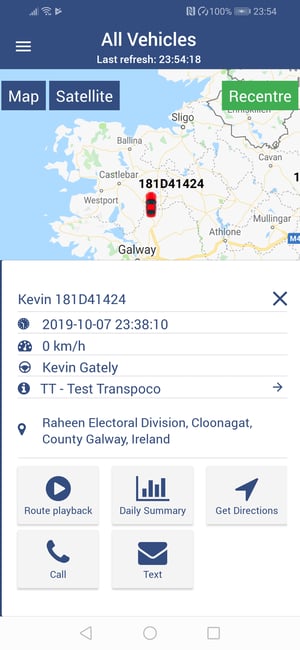
- Vehicle registration number
- Date and time of last update
- Vehicle speed
- Driver’s name
- Vehicle status (this may need to be added)
- Location of vehicle
In addition, the following functionality is available on the screen:
- Route playback (link to Journey Report of vehicle’s journeys that day or selected period)
- Link to Daily Summary Report
- Get Directions (from selected location to the vehicle’s location in Google Maps)
- Call (driver)
- Text (driver)