![White Logo with transparent background.png]](https://www.transpoco.com/hs-fs/hubfs/White%20Logo%20with%20transparent%20background.png?height=40&name=White%20Logo%20with%20transparent%20background.png)
What the magnet does
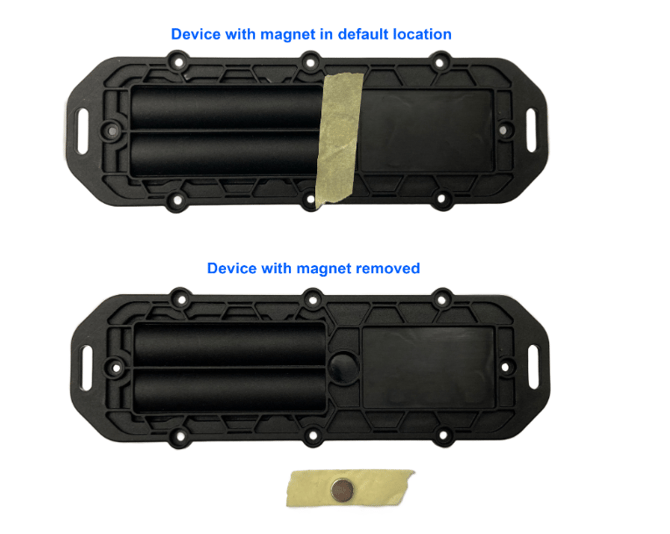
Every Barra GPS and Barra Edge tracker comes with a small magnet. The tracker can sense whether that magnet is sitting underneath it.
Your trackers are set up for tamper detection. This means the tracker expects the magnet to be there at all times. The moment the magnet is no longer next to the tracker, the tracker treats this as someone removing it from the asset, and sends a tamper alert to your Transpoco account.
How to fit it
- Fix the magnet to the asset first — glue it on, or attach it any other secure way. It needs to stay put on its own.
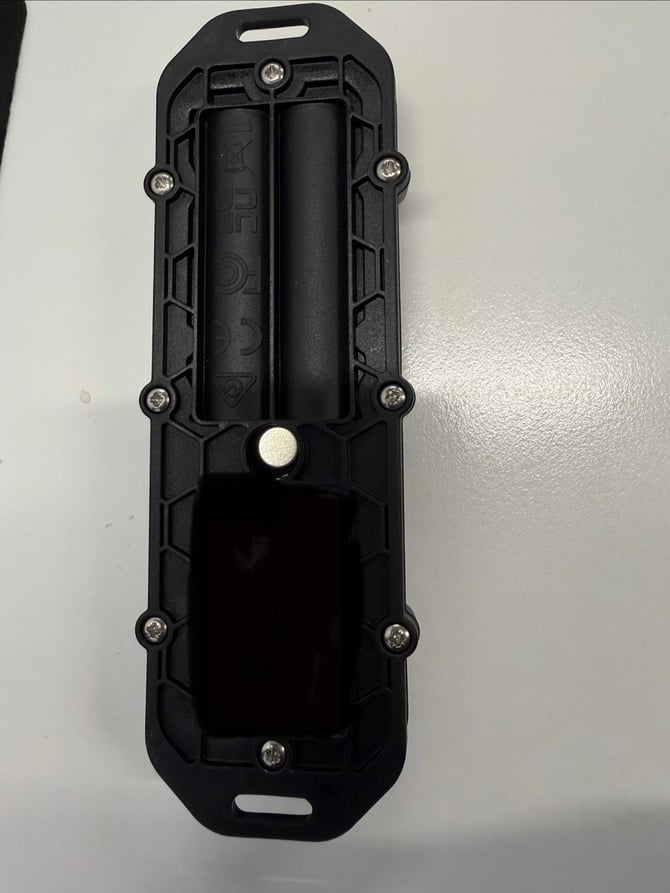
- Fit the tracker on top of the magnet. The magnet sits in the small recess on the back of the tracker housing (see the photo below).
- Secure the tracker to the asset as normal, using screws, bolts, cable ties or rivets.
What happens next
Once fitted, the tracker and magnet stay together for the life of the installation. If anyone pulls the tracker off the asset, the magnet stays behind, the tracker notices it's gone, and you get a tamper alert straight away.
Two things to avoid
- Don't leave the magnet off. Without a magnet underneath, the tracker behaves as though it has just been removed and will raise a tamper alert.
- Don't glue the magnet to the tracker instead of the asset. If the magnet travels with the tracker when it's pulled off, no alert is sent — which defeats the whole point.