![White Logo with transparent background.png]](https://www.transpoco.com/hs-fs/hubfs/White%20Logo%20with%20transparent%20background.png?height=40&name=White%20Logo%20with%20transparent%20background.png)
The Driver Mileage Summary displays the total business distance and private distance for a driver for a selected time period.
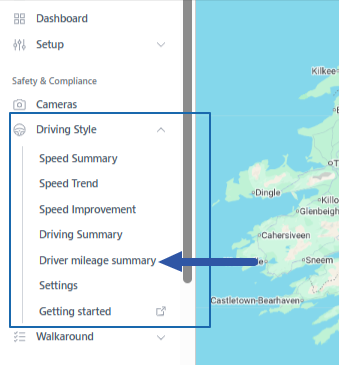
To find the Driver Mileage Summary go to Navigation Menu > Safety & Compliance > Driving Style > Driver Mileage Summary.
Here is an example of a Driver Mileage Summary for 1 month. In this example, some of the drivers recorded private distance during the selected time period.
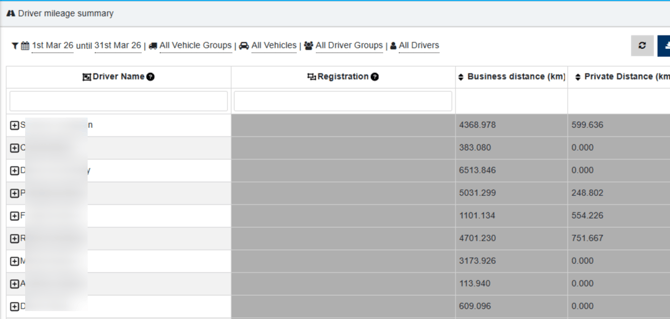
In order to differentiate between business and private distance, Transpoco has to provide a solution for privacy. This can involve fitting a privacy switch into the vehicle or using a key fob which will activate private mode if swiped over a key fob reader installed on the dashboard.
Distance can be assigned to a driver based on 2 methods:
- Driver ID involving an RFID card or a key fob reader installed into the vehicle
- Manually assign a vehicle registration to a driver
The Driver Mileage Summary provides the distance recorded for each driver in each vehicle during the selected time period. For example, in the Driver Mileage Summary below Robert drove 3 vehicles during the time period and we breakdown the business and private distance in each vehicle.
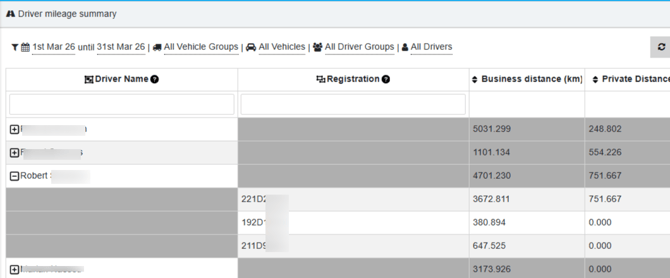
For journeys with unidentified drivers during the time period, the Driver Mileage Summary will group all of these journeys under the description 'Unknown Driver'.
In case the system has a fob used during journey but this fob wasn't assigned to a driver, the report will show the ID number next to "Unknown Driver".
Filter Options
There are options to filter the report located above the report.
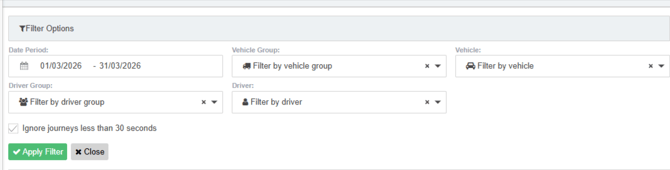
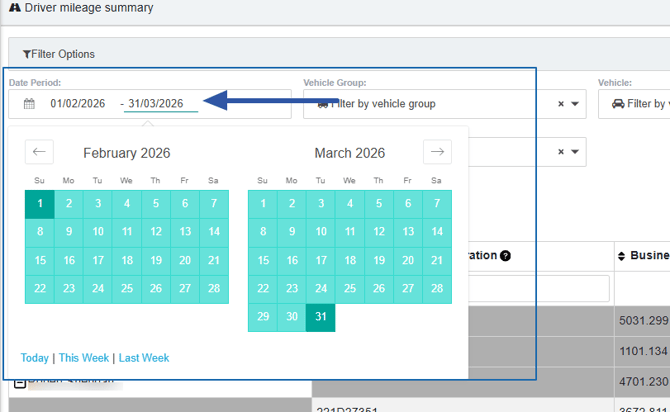
1. Date Period
2. Vehicles Group & Vehicle
You can select a group of vehicles from the available list of vehicles groups in your Transpoco account or select a vehicle from the list of vehicles.
3. Drivers Group & Driver
You can select a group of drivers from the available list of drivers groups in your Transpoco account or select a driver from the list of drivers.