![White Logo with transparent background.png]](https://www.transpoco.com/hs-fs/hubfs/White%20Logo%20with%20transparent%20background.png?height=40&name=White%20Logo%20with%20transparent%20background.png)
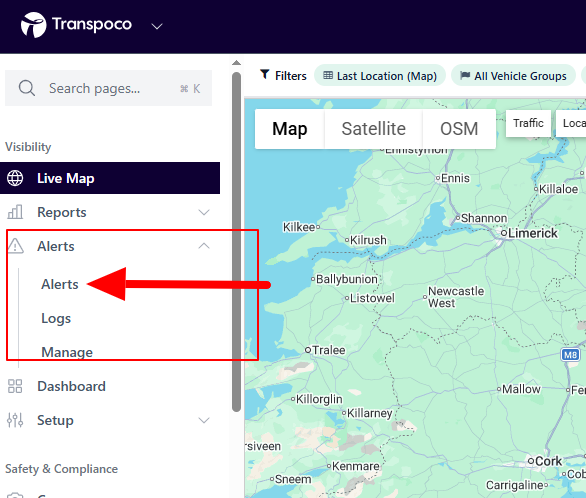
The Alerts report allow you to view cases of alerts which have been triggered. To find the report click Alerts under Alerts on the navigation menu.
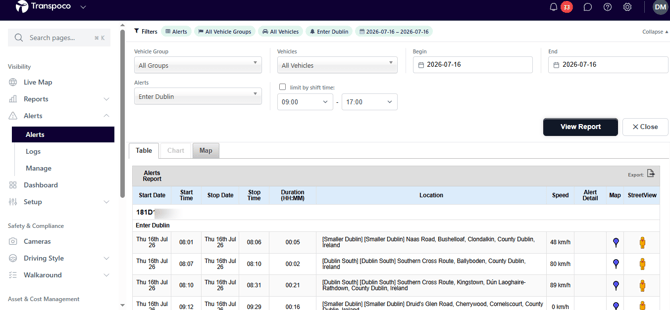
The filters for the Alerts report are similar to the filters for other reports. In the Alerts report you can run the report for all alerts or 1 alert.
In the example below, we generated an alerts report for 1 alert for 1 day. The alert is configured to show cases of the 'Enter Dublin' alert. This alert is configured to show vehicles which entered a location titled 'Dublin'. The specified area of Dublin is specified by the creator of the location in the Locations section.
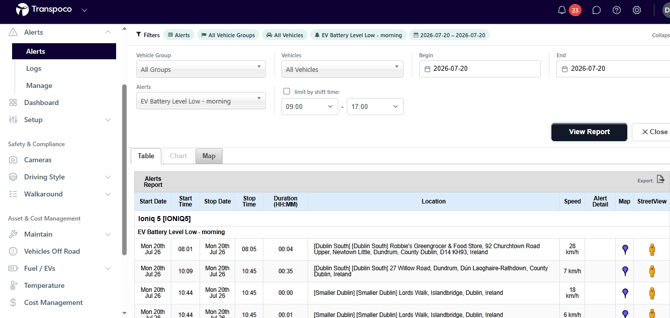
This report shows cases of the 'EV Battery Level Low - morning alert'. This alert is configured to trigger if the battery level drops below 20% before 07:00.