![White Logo with transparent background.png]](https://www.transpoco.com/hs-fs/hubfs/White%20Logo%20with%20transparent%20background.png?height=40&name=White%20Logo%20with%20transparent%20background.png)
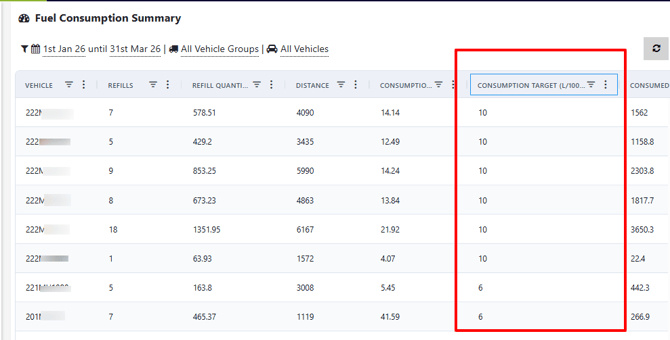
By entering a fuel consumption target for a vehicle, you can measure the actual performance against a target or recommended fuel consumption. In the example below, you can see a target fuel consumption for each vehicle in the Fuel Consumption Summary report.
 To enter a fuel consumption target go the navigation menu and under Setup menu select Vehicles.
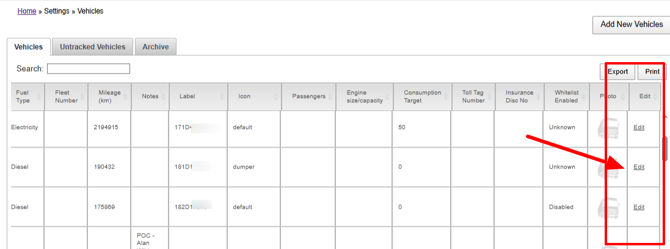
In the Vehicles section you will see the Consumption Target column. To enter a target for a vehicle, go to the last column 'Edit' and click edit for the selected vehicle.
After you click edit, a window will open displaying the details of the vehicle. Go down to the Consumption Target field and insert a fuel consumption target.
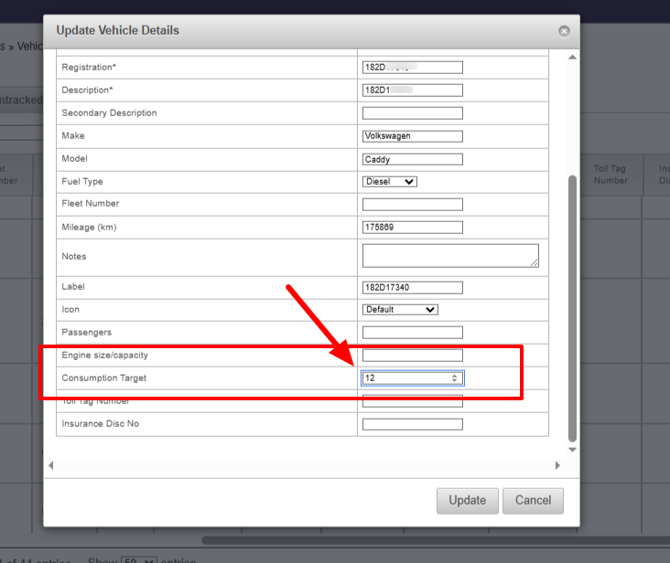
After you make the change, click the 'Update' button.