![White Logo with transparent background.png]](https://www.transpoco.com/hs-fs/hubfs/White%20Logo%20with%20transparent%20background.png?height=40&name=White%20Logo%20with%20transparent%20background.png)
The Report Activity log records the activity of users in your Transpoco account, providing the details of each action including the name of the user, the details of the report requested and the time and date of the login.
How to find the Report Activity Log
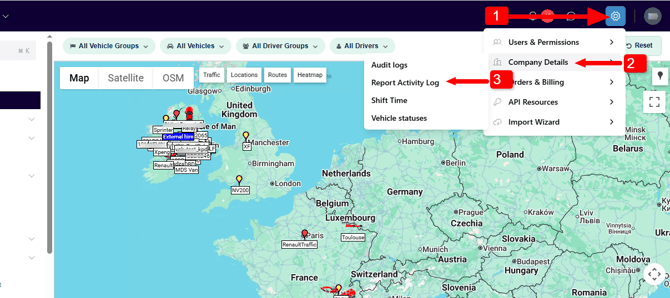
- Click the Settings icon in top right corner
- Select Company Details and on the sub-menu select Report Activity Log
Viewing the Report Activity Log
The Report Activity Log table opens, usually in descending date order (default)
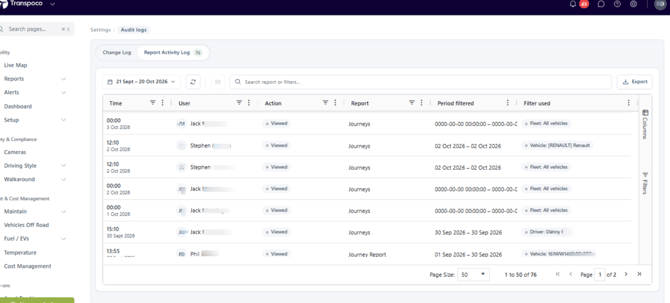
The standard information displayed in the Report Activity Log table is:
- Time: The date and time the report was processed
- User: The name of the user who processed the report
- Action: Identifies if the report was viewed or exported
- Period filtered: The time period of the report
- Filter Used: The vehicle selected for the report
Selecting the time period
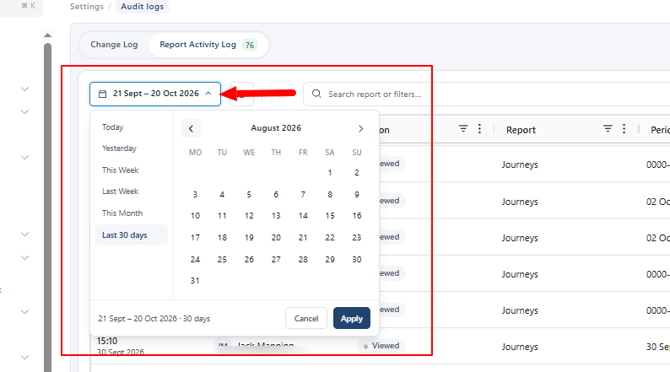
Above the Time column you can click into the default time period and select a customised time period or select a from the list of available time range (Yesterday, This Week, Last Week, etc.). Click the Apply button to apply the change