![White Logo with transparent background.png]](https://www.transpoco.com/hs-fs/hubfs/White%20Logo%20with%20transparent%20background.png?height=40&name=White%20Logo%20with%20transparent%20background.png)
The objective of the Vehicle Off Report is to show how much time vehicles are staying in garages. The "Duration" column with the "Status" column will provide users with this information.
You will also be able to check the time since vehicle exited the location / garage which will help you to quickly see the last time it was off road.
If the Status is "At Location", it means the vehicle is still there for the duration mentioned.
If the Status is "Exited", it means the vehicles exited the location already, but spent a number of hours or days at the informed location.
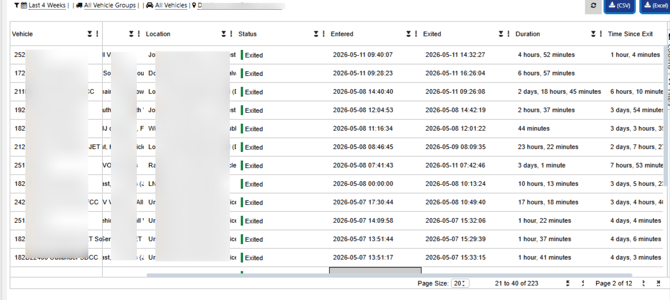
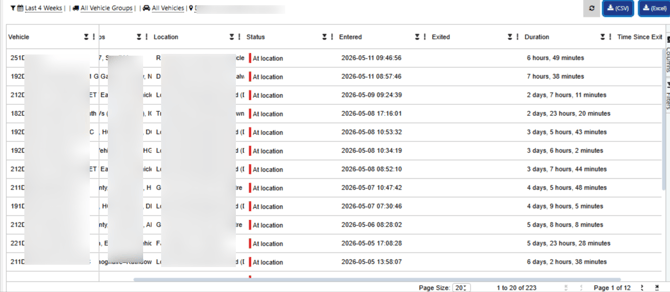
The report is also designed to be sorted by each column, filtered by the data you want, to have columns added and excluded, to have the data grouped by the column you wish, to be exported, etc.
To run this report, you can select the period of your choice, the vehicle group / individual vehicle and the group of garages of your choice.
How do I set the garages / group of garages I want?
You need to go to the "Locations" section and geofence the garages there.
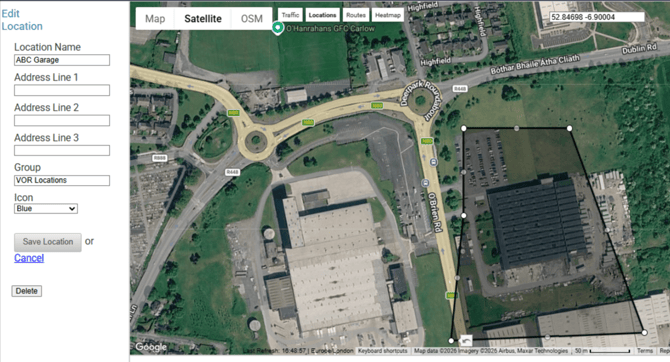
The most important thing when creating / editing these garages is to add the "Group" property to it as these groups must be selected on the VOR report. In the example above, we tagged the garage as 'VOR Locations' in 'Group'