![White Logo with transparent background.png]](https://www.transpoco.com/hs-fs/hubfs/White%20Logo%20with%20transparent%20background.png?height=40&name=White%20Logo%20with%20transparent%20background.png)
Th Fleet Summary report provides provides a summary of total activity for each vehicle in your fleet during the selected time period.
Here is an example of the Fleet Summary Report:
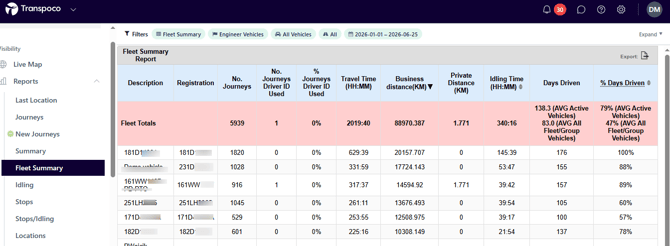
This report is useful for customers who utilise a driver ID process. The Fleet Summary provides a data on driver ID for each vehicle.
How to Export the Fleet Summary Report
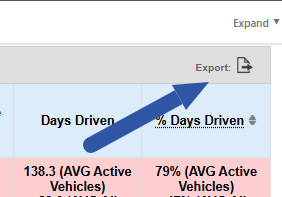
To export the Fleet Summary report, click the 'Export' icon above the % Days Driven column.
You can add extra columns to the export of the Fleet Summary report. During the process to export the report you add additional columns from a list of additional columns - see the screen below.
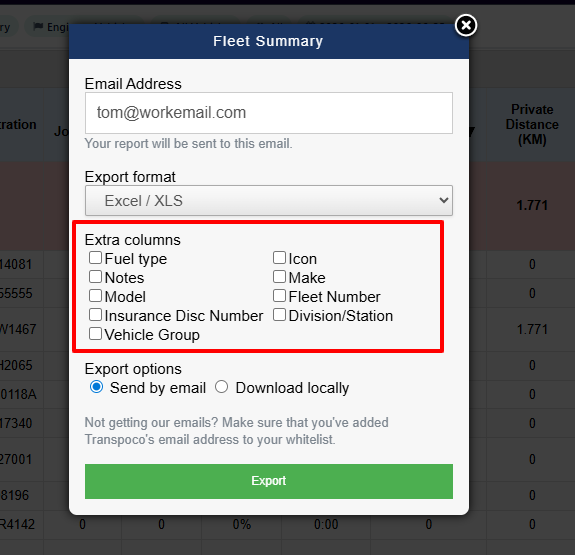
You can export the Fleet Summary to CSV or Excel.